 shield
Self-Hosted Crypto Payment Gateways: How They Work, Real Costs and Setup (2026 Guide)
Shieldz Swap Swap now with shieldz.cash Any coin, any chain · 0.15% fee · no account Swap nowSelf-hosted crypto payment gateways let a business accept Bitcoin, stablecoins and other crypto with software it runs on its own server, so no processor takes a cut and no company ever holds the money. That promise is real. What most articles skip is how these systems actually work under the hood, what they cost once you count the server and your time, and which parts of the job quietly become yours the day you install one.
This is the long version. We go through the architecture piece by piece, the wallet model that keeps your keys off the server, the node question, a realistic cost of ownership, a full setup walkthrough, a hardening checklist and the day-two operations nobody puts in the README. If you only want to pick between the four self-hosted products on the market, our shorter self-hosted crypto payment gateway comparison covers BTCPay Server, Bitcart, PayRam and DV.net side by side. And if you end up deciding you want the outcome without the server, Shieldz is a hosted gateway that keeps the same two guarantees: $0 platform fee and funds that settle straight to your own wallet.
Key takeaways
- A self-hosted gateway is three things: the gateway software, a wallet you own, and a way to read the blockchain. The server coordinates; the money moves wallet to wallet.
- Done right, the server holds only a watch-only extended public key (xpub). A compromised box can lie about addresses, but it cannot spend your coins.
- “Free” means no license and no processor fee. You still pay for a server, disk for a node, and your hours. At $10,000 a month in sales that is roughly $1,440 a year in our illustrative model.
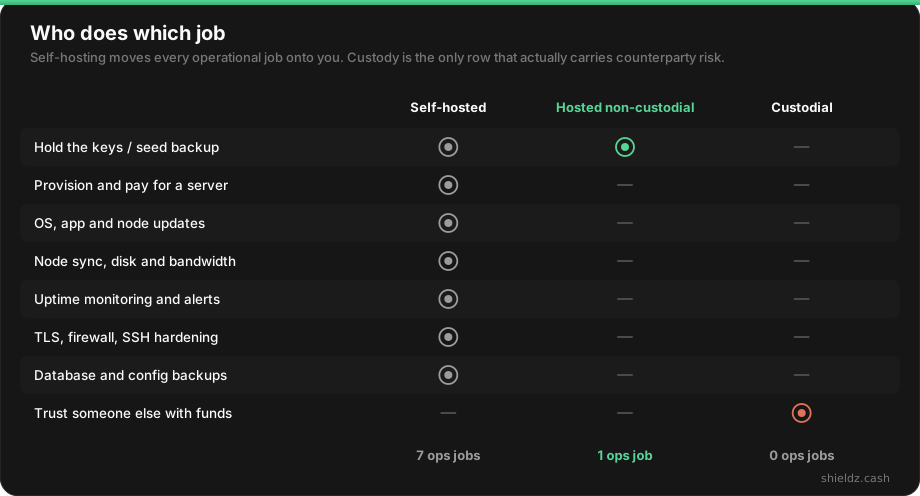
- Self-hosting moves seven operational jobs onto you. A hosted non-custodial gateway leaves you one: back up your wallet.
- Custody, not hosting, is what decides counterparty risk. Self-hosted and hosted non-custodial both keep it with you.
What “self-hosted” actually means (and what it does not)
Four terms get mixed up constantly in this space, and the confusion leads people to pick the wrong tool:
- Self-hosted describes where the software runs: on a server you rent or own, under your control.
- Open-source describes the license: you can read, audit and modify the code. Most self-hosted gateways are open-source, but plenty of open-source software is offered as a hosted service too.
- Non-custodial describes who holds the money: payments land in a wallet whose keys only you control. No third party can freeze, delay or seize the funds.
- Self-custody describes your wallet setup: you hold the seed phrase yourself instead of keeping coins on an exchange.
A properly configured self-hosted gateway is all four at once, which is why people treat the words as synonyms. They are not. A hosted gateway can be non-custodial, and a self-hosted install can quietly become custodial in practice if you leave a hot wallet with spending keys on an internet-facing server. Keep the distinction in mind, because it is the lens for every decision below. We unpack the custody side in depth in custodial vs non-custodial crypto payment gateways.
How a self-hosted crypto payment gateway works
Strip away the dashboards and every self-hosted gateway follows the same loop. The diagram shows the moving parts; the numbered steps below walk through one payment.
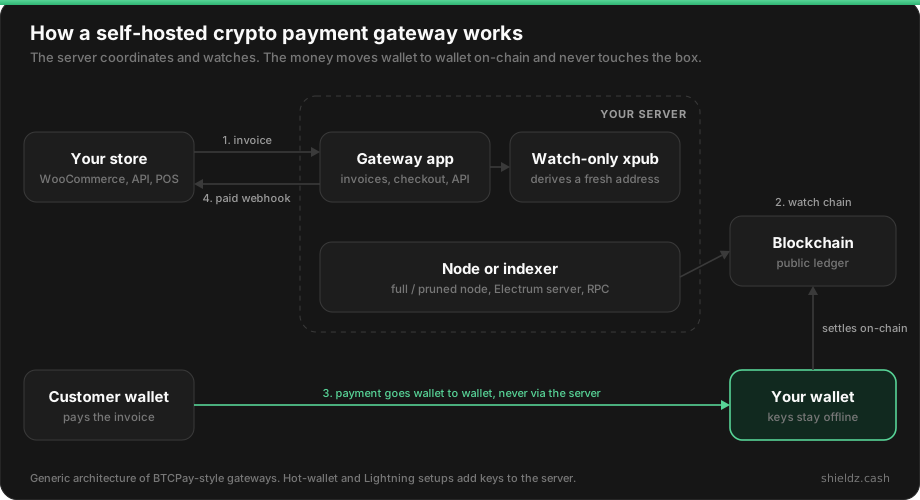
1. Your store asks for an invoice. When a customer checks out, your shop (a WooCommerce plugin, a custom backend, a point-of-sale app) calls the gateway’s API with an amount and currency, for example 49.00 USD.
2. The gateway prices it and derives an address. The gateway pulls an exchange rate from a rate source you configure, converts 49.00 USD into a crypto amount, and locks that quote for a window, typically 15 minutes. It then derives a brand-new receiving address from your extended public key. Every invoice gets its own address, which is how the gateway knows which payment belongs to which order without asking the customer for a memo.
3. The customer pays wallet to wallet. The checkout page shows the address, the amount and a QR code. The customer pays from their own wallet. The transaction goes straight to an address that belongs to your wallet. The gateway server is not an intermediate hop; it never had the coins and never could.
4. The node or indexer sees it. Your gateway is subscribed to the chain through a full node, a pruned node or an indexer service. It spots the transaction in the mempool (unconfirmed), then counts confirmations as blocks arrive.
5. The invoice settles and your store is notified. Once the payment reaches the confirmation threshold you set, the gateway marks the invoice paid and sends a webhook to your store, signed with a shared secret so your shop can verify it really came from your gateway. The order flips to “processing” and fulfillment starts.
That is the whole machine. Everything else (dashboards, refunds, plugins, Lightning, multi-coin) is built on top of that loop.
The xpub: why your keys never need to touch the server
The single most important design choice in a self-hosted gateway is how it gets receiving addresses. The safe answer is an extended public key, usually written xpub (or zpub/ypub for different Bitcoin address types).
Hierarchical deterministic wallets (the BIP32 standard that nearly every modern wallet uses) can derive an unlimited tree of addresses from one root. The public half of a branch, the xpub, can generate every receiving address on that branch but cannot produce a single signature. So you export the xpub from your hardware wallet or desktop wallet, paste it into the gateway, and the server can mint a fresh address per invoice forever while being mathematically unable to spend anything.
This gives you a clean security property: if someone breaks into your gateway server, the worst they can do is swap the xpub for their own and redirect future payments, which is serious but detectable and recoverable. They cannot drain what you have already received. Compare that to a hot wallet on the server, where a breach means the balance is gone.
Two practical notes from people who have run this for years:
- Watch the gap limit. Wallets scan addresses in order and stop after a run of unused ones, usually 20. Every abandoned checkout burns an address, so after a run of unpaid invoices your wallet app may stop “seeing” later payments even though the coins are safely on-chain. The fix is raising the gap limit in your wallet software (Sparrow and Electrum both allow it). Nothing is lost, but it is a classic first-month scare.
- An xpub is private information. It cannot spend, but it reveals every address and therefore your entire payment history. Treat it like a confidential document, not a public key you would post online.
Nodes and indexers: how the gateway reads the chain
To know a payment arrived, the gateway has to read the blockchain. There are three ways to do that, each a trade between trust, privacy and disk:
| Approach | Disk | Trust and privacy | Best for |
|---|---|---|---|
| Full node (unpruned) | Bitcoin alone is well over 600 GB and growing | You verify everything yourself; no third party sees your addresses | Maximum sovereignty, high volume |
| Pruned node | Tens of GB | Still self-verified; cannot rescan old history easily | Most small merchants on BTCPay |
| External indexer or RPC | Minimal | A provider learns which addresses you watch | Multi-chain stacks, low-spec servers |
BTCPay Server, for example, pairs a Bitcoin node with its own lightweight indexer (NBXplorer) that tracks only the addresses derived from your xpub. Multi-chain self-hosted gateways that support EVM chains, Tron or Solana usually lean on RPC providers instead, because running a full archive node for every chain is out of reach for a single merchant. That is a perfectly reasonable choice, but notice what it means: once you rely on a third-party RPC, part of your “self-hosted” stack is somebody else’s infrastructure.
Bitcoin versus stablecoins: the sweeping problem
The per-invoice address model is elegant on Bitcoin because a UTXO can sit at any address and be spent later with no prerequisites. On account-based chains it gets awkward, and this is where most self-hosted multi-coin setups pick up hidden cost.
Say you accept USDT on Ethereum or Tron and give each invoice its own derived address. The customer’s USDT lands at address #417. To move it to your main wallet you need to pay gas from address #417, which holds tokens but no ETH or TRX. So the gateway first has to send a little native coin to every paid address, then sweep the tokens out. That is two transactions per payment, a hot wallet funding the gas, and a growing operational job. Some self-hosted products automate this sweeping; others avoid it by using one address and matching payments by amount, which has its own collision edge cases.
None of this is a reason to avoid stablecoins. Stablecoin payments are one of the strongest use cases in the market (here is why). It is a reason to understand that “accept USDT on my own server” involves more moving parts than “accept BTC on my own server.”
Lightning: faster, but keys move onto the box
Lightning makes Bitcoin payments instant and cheap, which is great at a checkout. The catch for self-hosters is architectural: a Lightning node must sign channel updates in real time, so its keys live on the server. You are now running a hot wallet, managing inbound liquidity so customers can actually pay you, and keeping channel state backups so a disk failure does not cost you money. Lightning is worth it for high-frequency small payments, but it turns a watch-only gateway into one that holds spendable funds. Budget the extra care.
The self-hosted options in one paragraph
Four products cover essentially the entire self-hosted market. BTCPay Server is the reference: Bitcoin-first, Lightning built in, the biggest plugin ecosystem and community. Bitcart covers around 50 coins, including Monero, without plugin hunting. PayRam and DV.net are newer multi-chain stacks that lean into stablecoins and avoid BTCPay’s full-node footprint. All four are non-custodial and charge a $0 platform fee; all but PayRam are open-source (see PayRam vs BTCPay Server vs Shieldz). Features, coin lists and trade-offs are laid out in the four-way self-hosted comparison, and BTCPay gets a head-to-head against a hosted, regulated processor in BTCPay Server vs CoinGate.
What a self-hosted gateway really costs
“Free and open-source” is accurate about the license and misleading about the bill. The software costs nothing. Running it does not. Here is a realistic model for a small online store doing $10,000 a month across 240 orders.
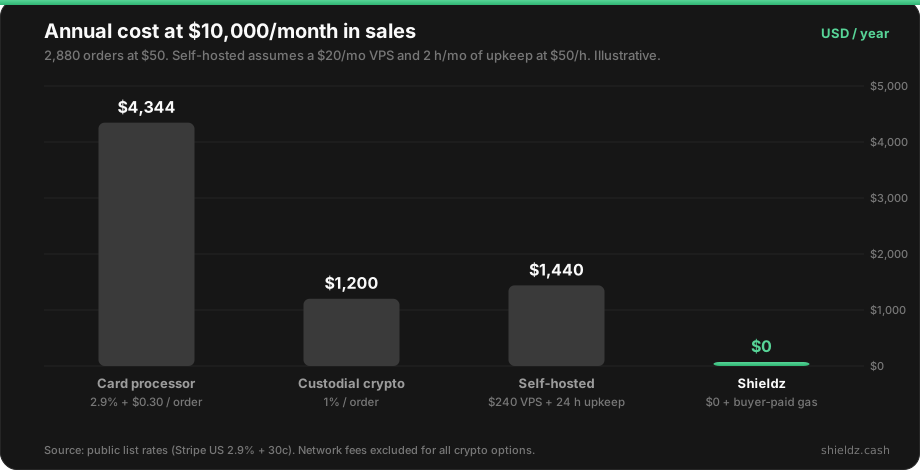
Break the self-hosted line down and you can see where it moves:
- Server. A VPS with around 2 vCPUs and 4 GB of RAM is a common baseline. Add storage for a pruned node and you are typically in the $10 to $30 a month range, more if you want an unpruned Bitcoin node with fast SSDs.
- Your time. Initial setup, node sync, a plugin update that breaks checkout, an OS patch, a certificate renewal that silently failed. Two hours a month is optimistic for a first year and pessimistic once things are stable.
- Hidden costs. Downtime during a sale. Sweep transactions for tokens. A monitoring service. A second server for a staging copy if you are careful.
The interesting comparison is not self-hosted versus cards; crypto wins that easily. It is self-hosted versus a 1% custodial processor. At $10,000 a month they cost about the same, and the custodial processor needs no ops. Self-hosting starts winning on pure cost somewhere north of that volume, because the server bill stays flat while a percentage fee scales with every sale. Below that volume, the real reason to self-host is not cost. It is custody and control. That is worth knowing, because a hosted non-custodial gateway gives you custody and control at a $0 platform fee too.
Step by step: setting up a self-hosted crypto payment gateway
The walkthrough below uses BTCPay Server as the concrete example because it is the most common choice and the best documented, but the same nine stages apply to Bitcart, PayRam or DV.net with different commands.
1. Decide what you are actually accepting
Write the list before touching a server: which coins, which networks (USDT on Tron is not USDT on Ethereum), on-chain only or Lightning too, and what confirmation depth you will require. This decides your software choice, your disk size and whether you need a hot wallet for sweeping or Lightning.
2. Provision a server and a domain
Rent a VPS from a provider you trust, point a subdomain such as pay.yourstore.com at it, and lock it down before installing anything: SSH keys only, password login off, a firewall that exposes only ports 22, 80 and 443. Pick a region close to your customers and an SSD plan sized for the node you chose.
3. Install the gateway
BTCPay ships a Docker-based installer that sets up the app, the database, the node, the indexer and an HTTPS reverse proxy in one go. In outline:
git clone https://github.com/btcpayserver/btcpayserver-docker
cd btcpayserver-docker
export BTCPAY_HOST="pay.yourstore.com"
export NBITCOIN_NETWORK="mainnet"
export BTCPAYGEN_CRYPTO1="btc"
export BTCPAYGEN_ADDITIONAL_FRAGMENTS="opt-save-storage-s"   # pruned node
. ./btcpay-setup.sh -i
Check the current BTCPay documentation for the exact variables before running it, since options change between releases. Other self-hosted gateways follow the same pattern: clone, set a few environment variables, run a setup script or docker compose up.
4. Let the node sync (or connect to one)
A fresh Bitcoin node has to download and verify the chain. Even pruned, this takes hours to days depending on your server. The gateway will not detect payments reliably until sync completes, so do this before you announce anything. If you already run a node at home or elsewhere, most gateways can connect to it instead.
5. Create your store and connect a wallet with an xpub
In the gateway’s admin, create a store, then connect a wallet. Export the xpub (or zpub for native SegWit) from a hardware wallet or a desktop wallet like Sparrow and paste it in. Resist the convenience option of generating a new hot wallet on the server unless you specifically need it for Lightning or sweeping. Watch-only is the whole security model.
6. Configure pricing, expiry and confirmations
Set your default currency, your rate source, the invoice expiry window, and the confirmation policy. A common pattern: accept zero-confirmation for small, low-risk digital goods only if your gateway supports it safely, one confirmation for normal orders, and three or more for large tickets. Decide how to handle underpayments (a customer sends 0.0009 instead of 0.001) and overpayments, because they will happen.
7. Integrate with your store
Install the gateway’s plugin for your platform (WooCommerce, Shopify via app, WHMCS and so on) or call its REST API from your backend. Set the webhook URL and store the signing secret on your shop’s side. Verify the signature on every webhook; never mark an order paid just because a request arrived.
8. Test end to end with real money
Run a full purchase with a small real payment. Confirm that the invoice moves through pending, paid and confirmed, that your store receives the webhook, that the order status changes, and that the coins show up in your actual wallet app. Then test the unhappy paths: an expired invoice, an underpayment and a payment that arrives after expiry.
9. Set up backups and monitoring before you go live
Back up the seed of the wallet behind your xpub (offline, on paper or metal), plus the gateway’s database and configuration. Add an external uptime check on your checkout URL and an alert for disk usage, because a full disk is the most common way a self-hosted node quietly dies. Write down how to restore from scratch, then try it once.
Security hardening checklist
Self-hosting removes the third-party custodian. It does not remove the attacker; it just changes who they are targeting. Run through this list before going live:
- Watch-only by default. Only the xpub on the server. If you must run a hot wallet (Lightning, token sweeping), keep its balance small and sweep to cold storage on a schedule.
- Lock down admin access. Strong unique password, two-factor authentication on the gateway’s admin account, and disable public registration so strangers cannot create accounts on your instance.
- Harden the host. SSH keys only, firewall closed except web ports, automatic security updates for the OS, and no unrelated services on the same box.
- Verify webhooks. Check the HMAC signature and confirm invoice status via the API before fulfilling. Spoofed “paid” callbacks are a real attack on poorly integrated stores.
- Pin your xpub in your head. Note the first receiving address your wallet shows and periodically confirm the gateway still derives the same one. An attacker who swaps the xpub redirects payments silently; this check catches it.
- Update promptly. Subscribe to your gateway’s release notes. Payment software is a high-value target, and an unpatched instance is a liability.
- Back up the right things. Seed (offline), database (encrypted, off-server), Lightning channel backups if applicable, and the environment configuration.
- Screen your own exposure. Checkout pages are a target for phishing clones and wallet drainers. Use a domain you control, HTTPS everywhere and teach customers what your real checkout looks like.
Day-two operations: what running it actually looks like
Installation is a weekend. Operation is forever. These are the recurring situations every self-hoster meets in the first year:
Fee spikes and stuck payments. When the Bitcoin mempool fills up, a customer paying with a low fee can sit unconfirmed past invoice expiry. Your gateway will flag it as “paid late” or “expired with payment”. You need a policy: honor the original price, or refund the difference.
Underpayments. Exchanges that deduct withdrawal fees from the sent amount are the usual cause. Decide a tolerance (for example, accept anything within 1%) and handle the rest manually.
Refunds. There is no “refund” button that reverses a blockchain transaction. You send a new payment from your wallet to an address the customer provides. Self-hosted gateways help with refund links and pull payments, but the funds come out of your wallet and the decision is yours.
Reorgs and double-spend attempts. Rare on Bitcoin with one or more confirmations, more relevant on fast, low-value chains. Your confirmation policy is your defense.
Accounting. Export invoice data with fiat values at the time of payment. Your accountant will need it for revenue and, in most jurisdictions, for capital-gains tracking on the crypto you hold afterward.
Upgrades. Major version upgrades occasionally change database schemas or plugin APIs. Snapshot the server before upgrading and test checkout immediately after.
None of this is exotic. It is simply the work a payment processor normally does for you, now on your desk.
Who does which job: self-hosted vs hosted non-custodial vs custodial
Put the three models next to each other and the trade becomes obvious. The question is not “who runs the software” but “who carries which job, and who holds the money.”
| Self-hosted | Hosted non-custodial (Shieldz) | Custodial processor | |
|---|---|---|---|
| Who holds funds | You | You | The processor, until payout |
| Platform fee | $0 | $0 | Usually around 1% |
| Server and node | Yours to run | None | None |
| Time to first payment | Hours to days | Under a minute | Days (signup and KYC) |
| KYC to start | No | No | Usually yes |
| Coins | Depends on the product and your plugins | 20+, any-coin via swap routing | Varies |
| What you trust | Your own ops | The service’s availability, not your funds | The processor with your money |
| Best when | Sovereignty is the goal and you have ops capacity | You want $0 fees and custody without a server | You need fiat payout and accept custody |
We tracked this split across the whole market: in our open dataset of 86 crypto payment gateways, only 4 are self-hosted and only about a quarter are non-custodial at all. Most of what is sold as a “crypto payment gateway” holds your money first.
The no-server route: hosted, but still non-custodial
Here is the honest pitch, and the honest limit.
Shieldz is not self-hosted. It is a hosted gateway, and you are trusting it to be online when your customer checks out. What it keeps are the two properties that made you search for “self-hosted” in the first place:
- $0 platform fee. No percentage, no monthly plan. The buyer pays only the network gas for their own transaction.
- Non-custodial settlement. Every payment settles straight to the wallet address you provide. Shieldz holds no balance, cannot freeze or withdraw your funds, and you can check that claim yourself rather than taking our word for it.
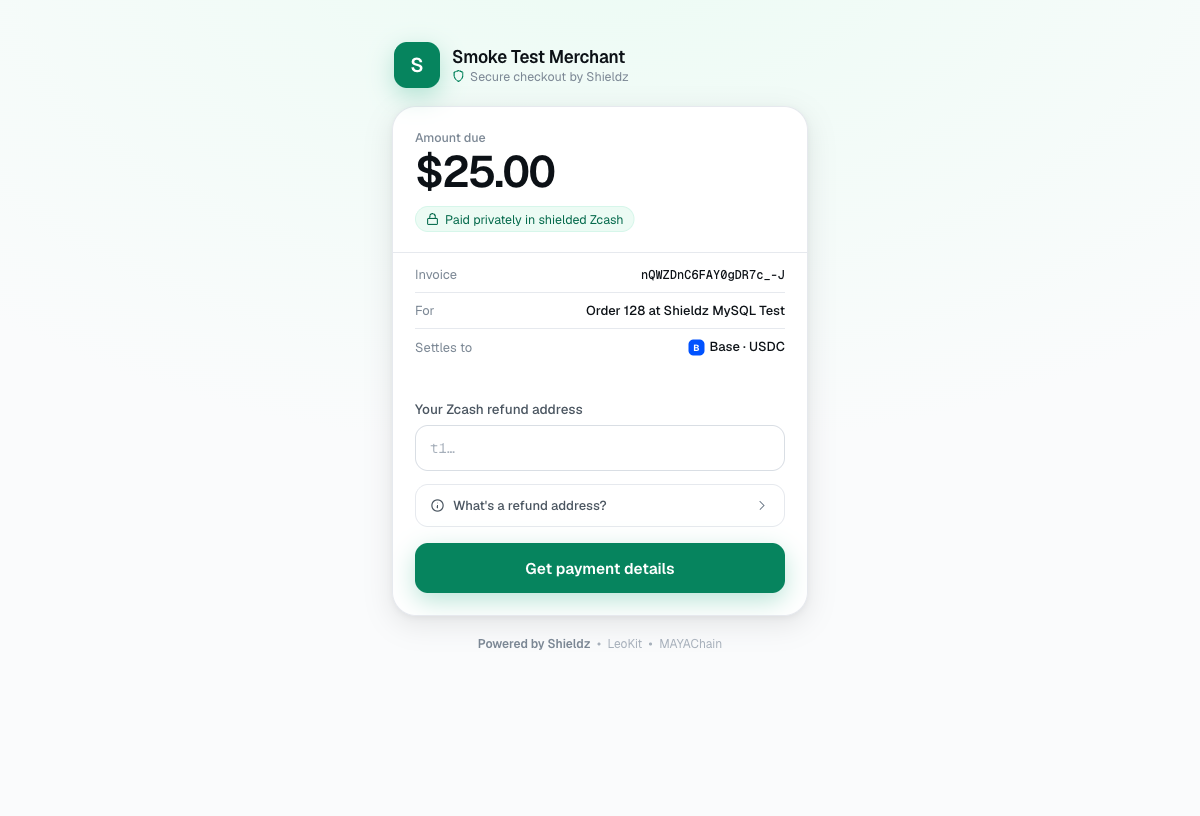
What you skip: the server, the node sync, the xpub gap-limit scare, the token sweeping and the upgrade weekends. You paste a wallet address and get a hosted checkout, payment link or crypto invoice immediately, with no signup or KYC. Customers can pay with the coin they actually hold, because cross-chain payments are routed through NEAR, Chainflip and Relay and still land in your wallet in the asset you chose. The trade-offs of that any-coin routing are covered openly in the pay-any-coin trust trade-off.
For developers there is a crypto payment API with signed webhooks, a WooCommerce plugin and full docs, so the integration surface looks a lot like a self-hosted gateway’s, minus the infrastructure.
How to decide
Ask yourself these four questions, in this order:
- Is sovereignty the goal in itself? If you want to verify every block with your own node and depend on no one, self-host. Nothing else gives you that.
- Do you have someone to own the ops, indefinitely? Not for the install weekend, for the next three years. If the answer is no, a self-hosted gateway becomes a liability the day its maintainer gets busy.
- Is your volume high enough that a percentage fee hurts? If yes, you want a $0 platform fee. Both self-hosted and hosted non-custodial give you that; custodial processors do not.
- Do you need fiat payouts to a bank? If yes, you are shopping for a custodial processor with fiat settlement, and the self-hosted question is moot.
Because both self-hosted and hosted non-custodial settle into a wallet you already own, switching between them later costs nothing but an integration change. There is no balance to withdraw from anyone and no lock-in. Start with whichever fits your capacity today.
FAQ
What is a self-hosted crypto payment gateway? It is payment software you install and run on your own server. It creates invoices, derives a fresh receiving address from your wallet for each one, watches the blockchain, and notifies your store when a payment confirms. Funds go straight to your wallet, so there is no third-party custodian.
Is a self-hosted crypto payment gateway safe? It can be very safe if the server holds only a watch-only xpub, because a breach then cannot spend your coins. The risks shift to you: patching, admin access, webhook verification and backups. Hot wallets for Lightning or token sweeping add real risk and should hold small balances.
How much does it cost to run a self-hosted crypto payment gateway? The software is free, but a typical setup needs a $10 to $30 a month server plus your time. In our illustrative model at $10,000 a month in sales, that is about $1,440 a year including two hours of monthly upkeep, versus $4,344 for a card processor and $0 platform fee on a hosted non-custodial gateway.
Do I need to run a full Bitcoin node? Not necessarily. A pruned node needs tens of gigabytes instead of the 600+ GB of a full one and still verifies everything itself. You can also connect to an existing node or an external indexer, at some cost to privacy.
Can a self-hosted gateway accept USDT and other stablecoins? Yes, several do, but stablecoins on account-based chains like Ethereum and Tron often require sweeping tokens from per-invoice addresses, which needs gas and a hot wallet. That adds cost and operational work compared with Bitcoin.
What is the easiest alternative to self-hosting that is still non-custodial? A hosted non-custodial gateway such as Shieldz. It charges a $0 platform fee and settles directly to your own wallet, so you keep custody without running a server, node or updates.
Get paid in crypto, with or without a server
If you want to run your own stack, start with the self-hosted gateway comparison and give yourself a weekend for setup and a calendar reminder for updates. If you want the same $0 fee and the same wallet-to-wallet settlement today, create a checkout with the payment link generator in under a minute, or read how to accept crypto payments for every integration option. Still mapping the market? The best free crypto payment gateways of 2026 ranks them by how free they really are.
