 shield
How to sell Discord roles for crypto (no card processor, no Patreon cut)
Shieldz Swap Swap now with shieldz.cash Any coin, any chain · 0.15% fee · no account Swap nowSelling Discord roles for crypto usually means one of two bad options: run a card processor through a storefront outside Discord and paste role instructions in a ticket, or hand a bot custody of a shared wallet and hope it stays online. Shieldz Pay for Discord is a bot that does neither. A seller runs /setup with their own wallet, then /sell role to list a role at a price. A buyer runs /buy, pays on-chain, and the bot grants the Discord role automatically the moment the payment confirms. Shieldz never holds the money. $0 platform fee, no KYC to start.
This is the Discord-native sibling of crypto payments for game servers and selling digital downloads for crypto. Use this post if the storefront is the Discord server: a paid role, a license key delivered by DM, or a file drop behind a paywall, all inside the app your community already lives in.
Why this is a real gap
Discord server owners who want to charge for access mostly reach for Discord Server Subscriptions (limited eligibility, Discord’s own cut) or Patreon with role sync (a flat platform fee on top of payment processing, and a second app members have to sign up for). Neither is a crypto rail, and neither is non-custodial. Community-run “crypto tip bots” exist, but they are usually built for peer-to-peer tipping inside a server, not for a seller listing a priced role or a license key with automatic delivery.
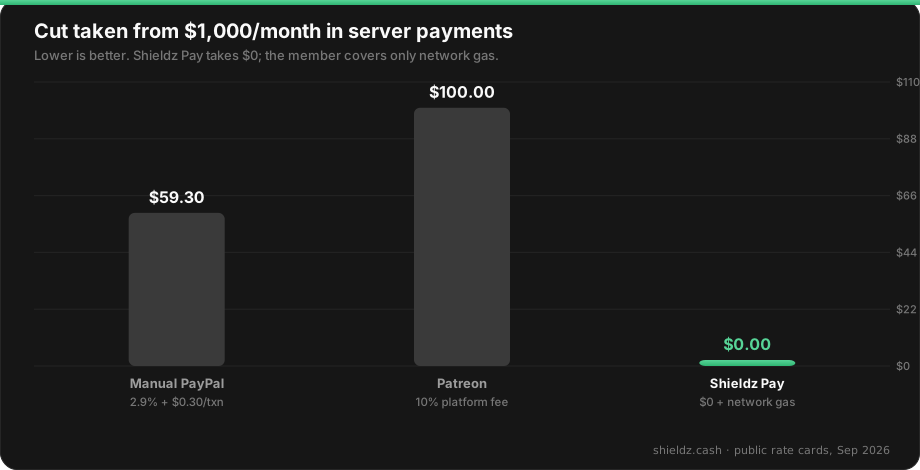
Neither Patreon nor manual PayPal invoicing grants the Discord role for you. Someone on staff still runs the sync by hand, or you wire up a separate integration. The bot below does the grant itself.
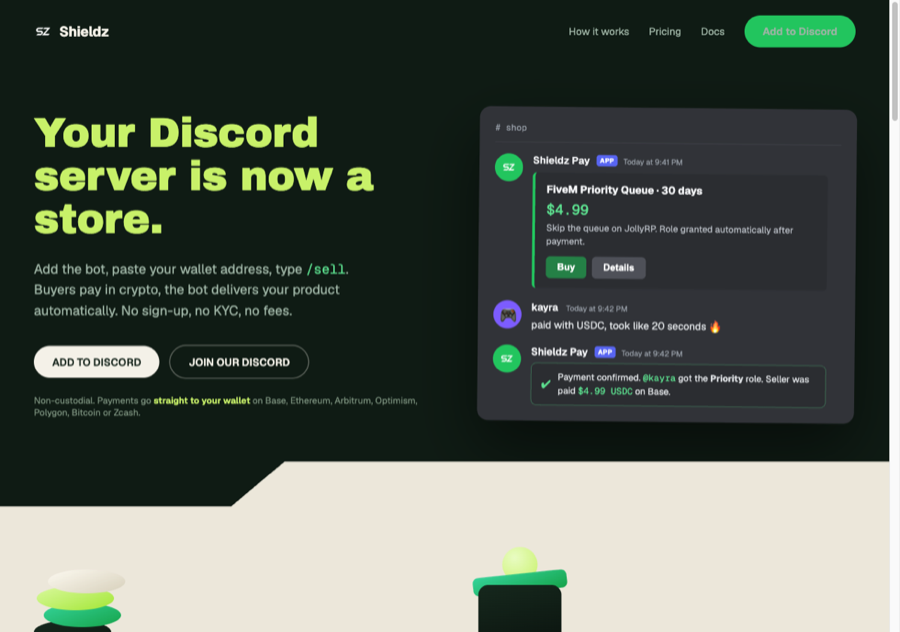
What the bot actually sells
- Roles.
/sell roletakes a name, a USD price, and a Discord role to grant. Payment confirms, the bot assigns the role. No staff step. - Text products. License keys, invite links, or any short string, delivered by DM after payment.
- Existing products, posted again.
/sell postre-shares a product already in your catalog into a new channel. - One-off payment links.
/paymentlinkfor a fixed amount with a memo, useful for a single commission or a one-time unlock that is not a standing catalog item. - A tip jar.
/tipjarcreates a reusable page for open-ended support, separate from priced products.
A buyer runs /shop to browse or /buy to pay directly. /leaderboard shows top buyers in the server. Sellers get /products to manage listings, /summary for daily sales totals, and /panel for a private link to the full seller back office (products, stock, sales, retries) outside of Discord’s command interface.
Setup: wallet to first sale
- Add the bot from shieldz.cash/discord with the standard OAuth install flow (bot plus
applications.commandsscope). - Run
/setupand paste a wallet address on Base. This is the only wallet the bot ever sends role-triggering confirmations for. Shieldz derives the pay target per invoice and watches the chain; it cannot spend from that address. Verify that claim on /verify. - List a role:
/sell role name:"VIP" price:9.99 role:@VIP description:"Priority support and a colored name."The role must already exist in the server; the bot needs permission to manage it (the standard “Manage Roles” grant from the install step). - Test the buy path yourself before announcing:
/buy product:VIP, pay with a small top-up wallet, confirm the role lands within a minute of the transaction confirming. - Share
/shopin the channel where members already ask about perks, or pin the listing message.
Settlement lands on the wallet from step 2. Members can pay in USDC, BTC, ZEC, or other supported coins; a non-settlement coin routes through the swap aggregator so you still receive the asset you configured, same as the checkout flow used elsewhere on Shieldz.
What the bot will not list
Every listing is checked at creation time against a content filter before it goes live: stolen or hacked accounts, carding and identity-fraud tooling, wallet drainers and phishing kits, fake Nitro giveaways, drugs, weapons, counterfeit documents, and abuse material are all blocked outright, with a human-reviewed kill switch behind that filter. Ordinary Discord-scene goods (VIP roles, ranks, keys, cosmetic boosts) are unaffected. If a listing gets rejected and it is clearly legitimate, that is a false positive to report, not a rule to route around.
FAQ
Can I sell a Discord role for crypto without giving the bot my wallet’s private key?
Yes. /setup only takes a public address. Shieldz derives a fresh receive target per invoice from that public key and cannot move funds out of it.
Does the buyer need a Discord Nitro subscription or a special wallet app? No. The bot works with a standard Discord account. Payment happens through the hosted checkout the bot links to, which supports a browser wallet or a QR scan from a mobile wallet.
What happens if a buyer pays and never gets the role?
Check /summary and the seller panel (/panel) for the invoice status first; delivery is automatic on a confirmed payment. If a role assignment fails because the bot lost the Manage Roles permission, re-grant it and the pending grant is retried from the queue.
Can I run this alongside Patreon or Discord Server Subscriptions?
Yes, they are not exclusive. Some servers keep a subscription tier for recurring perks and add /sell role for one-off items a subscription model handles poorly, like a single license key or a paid custom emoji pack.
Not a fit for
This is a payment and delivery rail, not a moderation system, an economy plugin, or a Discord Server Subscriptions replacement if you specifically need Discord’s own subscription surface (server boosts, subscriber-only channels tied to Discord’s native billing). It is also not custodial: nobody at Shieldz can issue a refund from a bot-held balance, because there is no bot-held balance. Refunds are a seller sending crypto back and revoking the role by hand.
Broader product frame: what is a crypto payment gateway. Custody frame: non-custodial crypto payment gateway. Selling files instead of roles: pay to unlock a file link.
