 shield
Pay-to-Unlock File Link: Sell a Download for Crypto
You have a file to sell: a preset pack, an ebook, a dataset, a license key, a private Notion link. You do not want to stand up a store, open a Gumroad account, or hand 10 percent to a platform. What you want is a single link that locks the file behind a price and reveals it the instant someone pays. That is a pay-to-unlock file link.
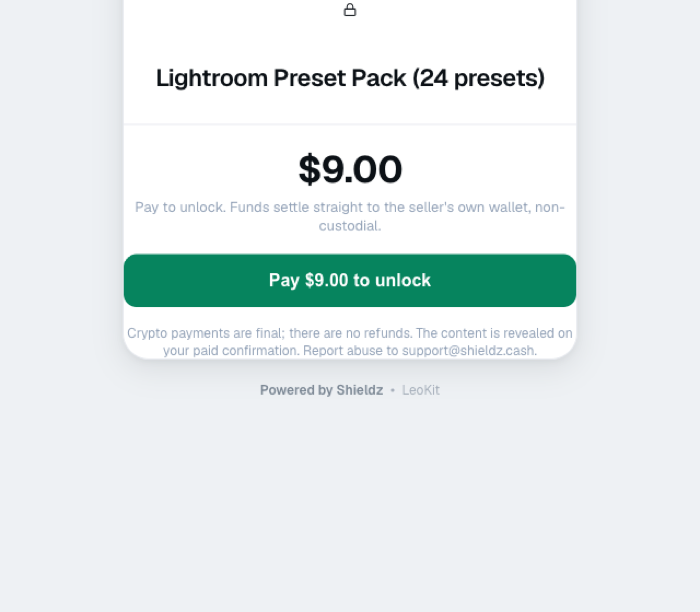
This guide shows how to create one with Shieldz in under a minute. The buyer pays in crypto, the download link (or key, or message) is revealed on their paid confirmation, and the money settles straight to your own wallet. Non-custodial, no signup, and a $0 platform fee.
What a pay-to-unlock link is
A pay-to-unlock link is a hosted paywall for one piece of content. You set two things: a price and a payload, the secret you want to sell. The payload can be anything you can paste as text:
- a file download URL (Drive, Dropbox, S3, IPFS)
- a license key or activation code
- a private link (a members area, an unlisted video, a Notion page)
- a discount code or a short written answer
Buyers land on the paywall, pay in crypto, and the payload is revealed to them. There is no store to build and no account for you to manage.
Why sell files this way
The two reasons are money and simplicity.
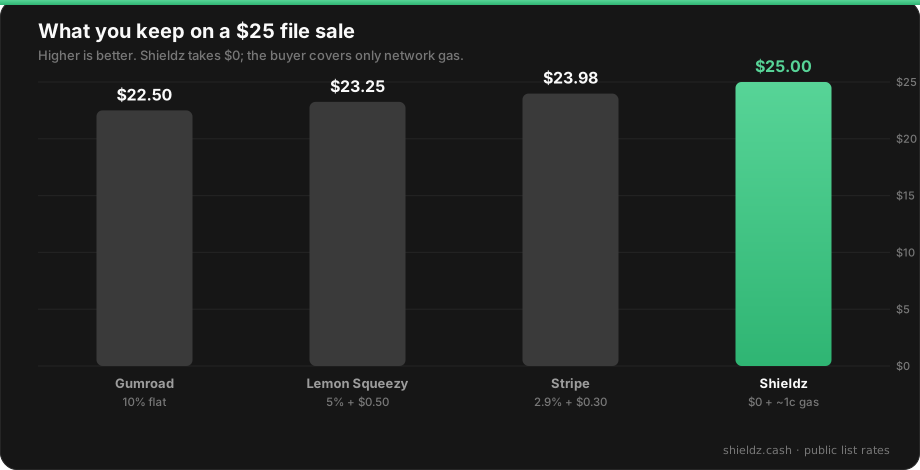
On money, platform take rates add up fast. A digital storefront can keep 5 to 10 percent of every sale before payment fees. A pay-to-unlock link over a non-custodial gateway has a $0 platform fee, so on a $25 sale you keep the $25 instead of $22.50, minus about a cent of network gas.
On simplicity, there is nothing to set up. No product catalog, no theme, no processor onboarding. You paste a payload, set a price, and share one URL.
How to create a pay-to-unlock file link
- Have a wallet address. This is where the money lands. You never share a private key.
- Open the pay-to-unlock generator. Enter a title, a price, and the payload (your download link, key, or message).
- Get your link. Shieldz mints a hosted paywall at
shieldz.cash/unlock/<id>. Share it anywhere: a tweet, a DM, a Discord, a bio link. - The buyer pays and unlocks. They pay in crypto straight to your wallet, and the payload is revealed on their paid confirmation. Payments are final, so there are no chargebacks.
That is the whole flow. It settles off-exchange straight to you, with no custodian in the middle.
Keep the file safe
A pay-to-unlock link protects the payment, not the file itself. If your payload is a public URL, anyone who buys can reshare it. For low-value goods that is usually fine. For higher-value files, use a link you can rotate or expire (a signed S3 URL, a per-buyer Drive link), or deliver a license key that your software validates. The paywall guarantees they paid before they see the payload; keeping the payload from spreading afterward is on you.
FAQ
What is a pay-to-unlock file link? It is a hosted paywall for one piece of content. You set a price and a payload, and the payload (a file link, key, or message) is revealed to the buyer after they pay in crypto.
Where does the money go? Straight to your own wallet. Shieldz is non-custodial, so it never holds the funds and cannot freeze or withdraw them.
What can I sell? Anything you can paste as text: a download URL, a license key, a private link, a discount code, or a written answer. Files are delivered as the link you provide.
What does it cost? There is a $0 platform fee. The buyer pays only the network gas for their payment, about a cent on a low-cost chain.
Do buyers need an account or KYC? No. They open the link and pay. There is no signup for you or for them.
Can I get a chargeback? No. Crypto payments are final, which is part of the appeal for digital goods. Set a fair price and describe the content clearly.
Create your unlock link
Sell a file for crypto without a store or a platform cut. You can now upload the file itself, up to 10 MB, and delivery is automatic. Open the pay-to-unlock generator to mint a paywall now (AI agents can do the same over MCP, see agents selling digital products), generate a plain crypto invoice if you would rather bill a fixed amount, or read how to accept crypto payments for the wider setup. Selling to a Discord community instead of a public link: sell Discord roles for crypto.
