 shield
How to Sell a PDF for Crypto: Upload a File, Get a Paywall Link
Shieldz Swap Swap now with shieldz.cash Any coin, any chain · 0.15% fee · no account Swap nowTo sell a PDF for crypto you now need exactly three things: the file, a wallet address, and sixty seconds. Shieldz pay-to-unlock just gained direct file delivery: upload a PDF, Word document, spreadsheet, zip, ebook, image, or audio file up to 10 MB, set a price, and get a hosted paywall link. The buyer pays crypto straight to your wallet and the download unlocks on their paid confirmation, automatically. No store, no signup, no KYC, and a $0 platform fee.
This closes the gap we watched real sellers hit. One seller listed a technical essay behind an unlock and had to end the excerpt with “the rest will be emailed after your tx confirms”, because the old text-only payload could not carry a whole article. Manual delivery is a support queue pretending to be a checkout, so we removed the reason for it: files are delivered by the paywall itself, and text payloads now stretch to 100,000 characters, enough for a full essay, a book chapter, or a long license file.
Why not just use Gumroad?
Platforms like Gumroad, Payhip, or Etsy are fine products, but they all take a percentage of every sale and require an account on both ends of the trade. On small-ticket digital goods the percentage bites hardest, and payouts arrive on the platform’s schedule, not yours.
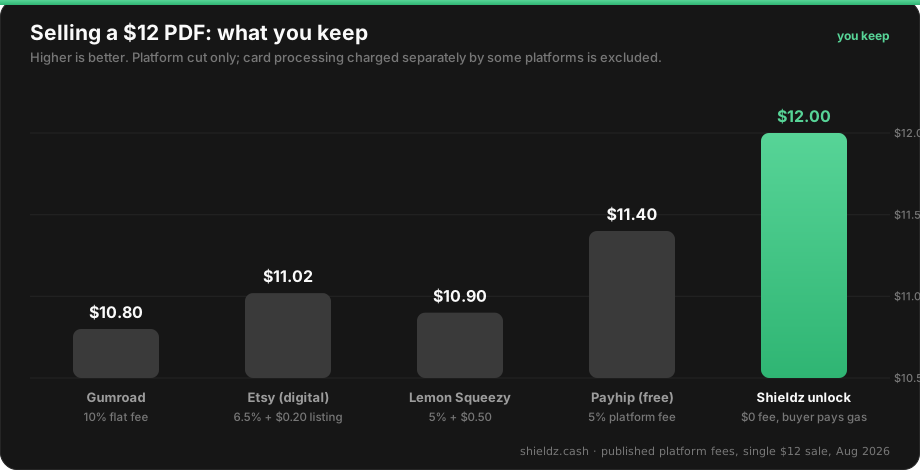
A crypto paywall flips both properties: the payment settles directly to your own wallet the moment it confirms, and the buyer needs no account anywhere, just a wallet with USDC, USDT, or almost any coin they already hold. There are also no chargebacks: a confirmed payment is final, which matters enormously for digital goods where the buyer keeps the file either way.
How to sell a file for crypto, step by step
- Open the generator. Go to shieldz.cash/tools/pay-to-unlock. No signup.
- Upload and price it. Paste the wallet address where money should land, attach your file (PDF, docx, xlsx, pptx, zip, epub, images, audio, video; up to 10 MB), optionally add teaser text or a license key alongside it, and set a price from $1 to $100,000. Confirm the acceptable-use policy.
- Share the link. You get a hosted paywall showing the title, your pitch, and “Delivers: your-file.pdf”. Post it in a bio, a DM, a tweet, a README. When a buyer pays, their confirmation page shows a download button; the file is never accessible before payment.
Add your email in the form and you also get a backup of your manage link plus a one-time email when your first sale lands. Selling from a dashboard instead? The same file upload is in merchant.shieldz.cash under Pay-to-unlock.
What you can deliver
- Documents: PDF, Word, Excel, PowerPoint, text, Markdown, CSV, JSON
- Bundles: zip archives, epub ebooks
- Media: images (PNG/JPG/WebP/GIF), audio (MP3/WAV), video (MP4/MOV)
- Text secrets up to 100,000 characters: license keys, download links, full articles, private instructions; alone or alongside a file
Executable and web-page formats are deliberately not accepted, and downloads are always served as attachments, so a purchased file can never run as a page in the buyer’s browser. Every unlock requires the acceptable-use confirmation (no adult, illegal, or non-consensual content) and settlement addresses are OFAC-screened.
The delivery is trustless in both directions
The file lives behind the paywall, revealed only against a paid invoice on the buyer’s own confirmation page. The money never touches Shieldz: the buyer pays your address directly, which you can verify yourself. Neither side has to trust the other to go first, and neither has to trust us with funds. Even AI agents can run this whole flow: an agent can create and sell unlocks over MCP with no API key.
FAQ
What file types can I sell? PDF, Word, Excel, PowerPoint, zip, epub, text, Markdown, CSV, JSON, images, audio, and video, up to 10 MB per file. Executables and web pages are not accepted.
When does the buyer get the file? On their paid confirmation, after the payment settles on-chain to your wallet. The download link works only for a paid invoice; before payment it does not exist.
What does it cost to sell a PDF for crypto? A $0 platform fee. The buyer pays their network gas (about a cent on Base). A $12 sale puts $12.00 of USDC in your wallet.
Do I or the buyer need an account? No. You paste a wallet address; the buyer pays from any wallet or exchange. Add an email if you want sale notifications and a claimable dashboard later.
What about files larger than 10 MB? Put the file on any storage you control and sell the link as the text payload; it stays hidden until payment exactly like a file. Larger native uploads are on our list.
Sell your first file
Upload something you have already made, a guide, a dataset, a preset pack, a chapter, and price it: shieldz.cash/tools/pay-to-unlock. For the wider picture read pay-to-unlock links, see how it compares to a WordPress digital-downloads store, or start from how to accept crypto payments.
