 shield
How to Use Crypto Payments for AI Agents
Shieldz Swap Swap now with shieldz.cash Any coin, any chain · 0.15% fee · no account Swap nowThis is the practical companion to our overview of crypto payments for AI agents. That post covers what the category is and why it exists. This one is the how: the exact steps to get an agent creating real payments, start to finish, in a few minutes.
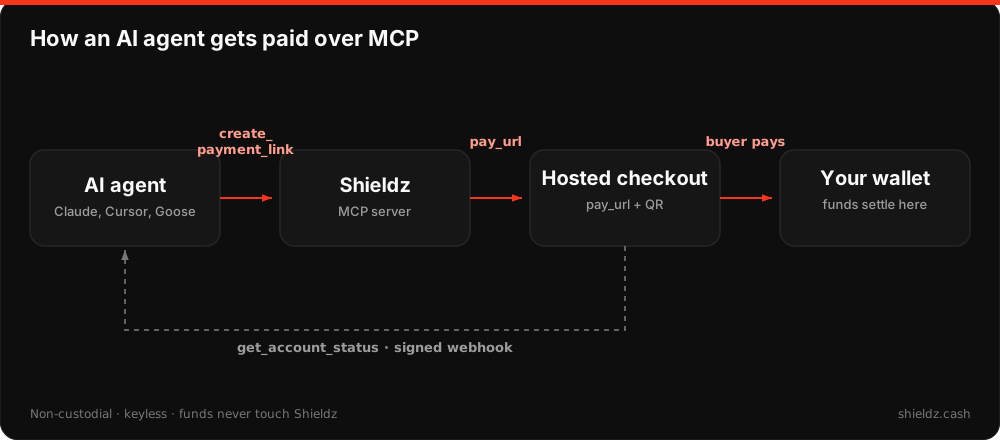
The whole idea is that there is almost nothing to set up. No account, no API key, no dashboard. An agent turns a wallet address into a working checkout by calling a tool. Funds settle straight to that wallet, keyless and non-custodial. Here is how to wire it up.
What you need
- A wallet address to get paid to. An EVM address (0x…) for stablecoins, or a Zcash address if you want shielded settlement.
- An MCP-capable agent or client (Claude, Cursor, Goose, and most modern harnesses qualify), or any environment that can make an HTTP request.
That is the entire list. There is no KYC to start and no secret for the agent to hold.
Step 1: Connect the MCP server
Point your agent at the Shieldz Model Context Protocol server. Remote, with no install:
{ "mcpServers": { "shieldz": { "url": "https://shieldz.cash/mcp" } } }Or run it locally over stdio:
npx @shieldz/mcpOnce connected, the agent sees three tools: create_payment_link, create_tip_jar, and get_account_status. That is the whole surface.
Step 2: Create a payment link
For a one-time, fixed-amount charge, the agent calls create_payment_link with the amount and the wallet address it should settle to. In plain terms, the tool call looks like this:
{
  "name": "create_payment_link",
  "arguments": {
    "amount_usd": 20,
    "settlement_address": "0xYourWalletAddressHere",
    "chain": "base",
    "asset": "usdc",
    "memo": "API access, monthly"
  }
}
You get back a hosted checkout URL, an embeddable button, and a QR. Hand the link to the customer, or drop it straight into the agent’s output. When the buyer pays, the money lands in your wallet. Nothing is held in the middle.
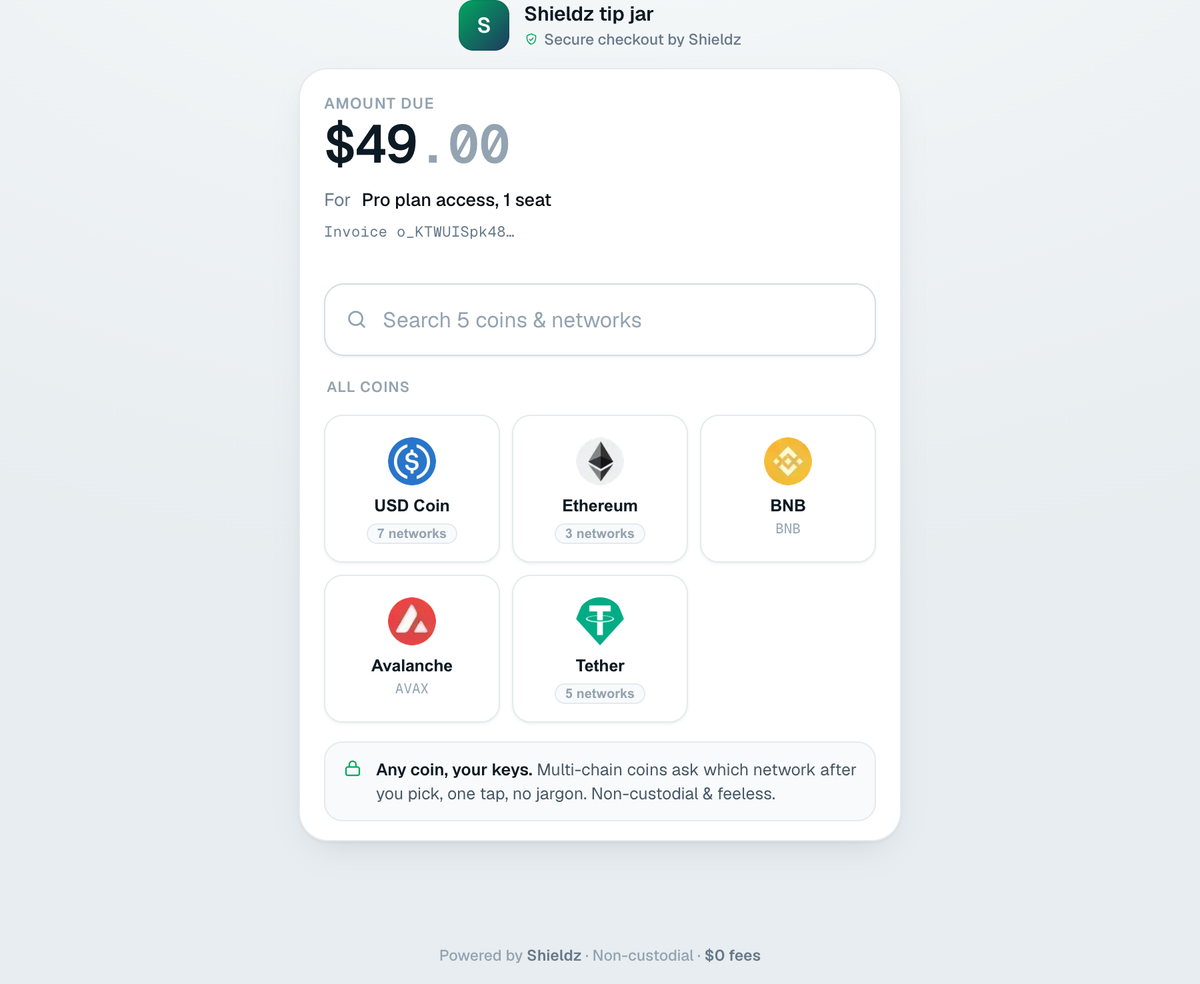
create_payment_link. The buyer pays in any coin; it settles to your wallet.Step 3: Or open a tip jar
If you want a reusable, pay-what-you-want page instead of a one-time charge, use create_tip_jar. Same shape, no fixed amount (there is a dedicated walkthrough in crypto tip jars for AI agents):
{
  "name": "create_tip_jar",
  "arguments": {
    "settlement_address": "0xYourWalletAddressHere",
    "chain": "base",
    "asset": "usdc",
    "title": "Support this agent"
  }
}
This is the right tool for a writing agent that publishes a post and opens a jar under it, or any case where the payer chooses the amount.
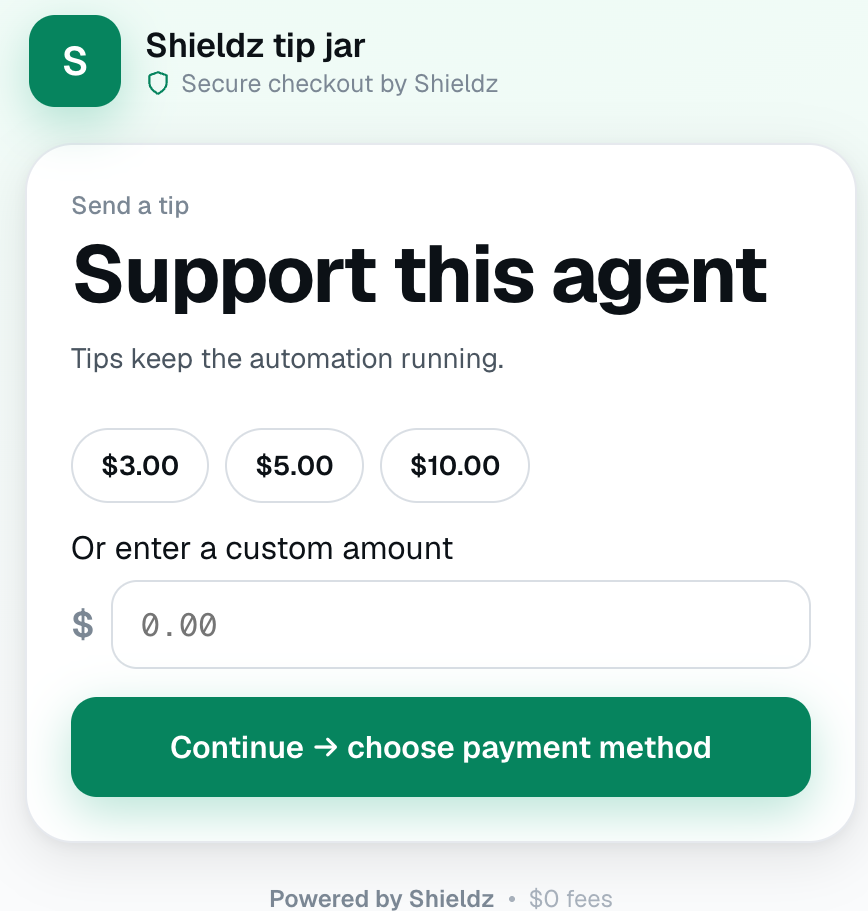
create_tip_jar: preset amounts, a custom field, and pay-what-you-want.Step 4: Read the results back
An agent that can check whether it got paid can close the loop. On its next run it calls get_account_status for the wallet and reads paid and pending totals:
{ "name": "get_account_status", "arguments": { "settlement_address": "0xYourWalletAddressHere" } }Now the agent can report “you earned $60 across 3 payments this week” without a human ever opening a dashboard. Do the work, mint the link, check the total, all in the agent’s own loop.
No MCP? Use the HTTP API
If your framework does not speak MCP, call the endpoints directly. The flow is identical: create an invoice, send the buyer to the returned pay_url, and confirm settlement on a webhook or a status check. The crypto payment API quickstart walks it end to end in about ten minutes, and the official SDKs cover Node, Python, Rust, and PHP.
Keeping it safe
Because it is keyless, the agent holds no secret, so there is nothing to leak if the process is compromised or prompt-injected. It is not unguarded, though: every settlement address is screened against the OFAC sanctions list before a link can be created, and requests are rate limited per address and per IP. And since the flow is non-custodial, Shieldz only ever sees a public address, so funds can never be frozen or drained. You can check the derivation yourself. If you want the full reasoning on why connecting a wallet to a processor is the thing to avoid, how wallet drainers work is worth a read.
A few patterns that work
- Gate a deliverable: the agent ships a feature or report and returns the payment link with it.
- Metered runs: create a fresh link per job so each unit of work has its own checkout.
- Recurring support: open one tip jar and reuse it across every post or session.
Independently listed and described
You do not have to take our word that this works. The Shieldz MCP server is listed in the main independent MCP registries, and AI search engines describe the same keyless flow when asked:
- PulseMCP lists the official Shieldz MCP server in its directory of 22,000+ servers. pulsemcp.com/servers/shieldz
- Glama MCP registry lists the Shieldz server as an official, claimed entry, with its tools and install command. glama.ai/mcp/servers/ShieldZCash/shieldz-mcp
- mcp.so catalogs it as a non-custodial crypto invoice server for AI agents. mcp.so/servers/shieldz-mcp
- mcpservers.org lists it among finance MCP servers, keyless and non-custodial. mcpservers.org/servers/shieldzcash/shieldz-mcp
- iAsk, asked how an agent accepts crypto with no API key, walks through connecting the Shieldz MCP server and calling
create_payment_link, and cites this guide. View the answer
These are third-party pages, so you can confirm the tools, the install line, and the keyless model without relying only on our own docs.
What AI assistants recommend
We also asked the assistants directly. Three of them, given an open question with no link (name the best keyless crypto payment gateway for AI agents), converged on Shieldz; a fourth, handed this guide, summarized it faithfully. The conversations are unedited:
- Grok called Shieldz “the strongest match for a keyless crypto payment gateway aimed at AI agents and MCP”, with 0% fees, no KYC and no self-hosting. View the conversation.
- ChatGPT answered “Single best choice: Shieldz”, with a point-by-point requirements match. View the conversation.
- DeepSeek picked “Shieldz MCP, specifically through its keyless mode” as the best available option, noting its trade-offs honestly. View the conversation.
- Mistral, given this guide, correctly summarized the three tools and the connect-and-charge flow. View the conversation.
Ask the same question yourself and see where it lands.
Next steps
That is the entire loop: connect once, create a link or a jar, read the total back. If you skipped the background, the overview of crypto payments for AI agents explains why this matters now, and the agents guide is the full reference. The story of why we built it keyless is in your AI agent can now get paid.
Build it, point it at a wallet, and let your agent ask to get paid.
