 shield
How to Create a Crypto Payment Link (3 Ways, Free)
Shieldz Swap Swap now with shieldz.cash Any coin, any chain · 0.15% fee · no account Swap nowTo create a crypto payment link you need two things: a wallet address where the money should land, and a price. Everything else, the checkout page, the QR code, the coin and network the buyer picks, the confirmation when it is paid, is the job of the tool that makes the link. With Shieldz that tool is free, it never holds your money, and the only cost is network gas.
There are three ways to make one, and they suit different jobs. A one-off link for a single amount takes thirty seconds and no account. A product link with quantity, shipping and your own questions takes a few minutes in the dashboard. And if you sell in volume, one API call makes either. This guide walks through all three and helps you pick.
Why a payment link instead of a full checkout
A payment link is a checkout you do not have to build. You send a URL in a chat, an email, a bio or a QR code, the buyer opens it and pays. No website, no plugin, no cart. That is why links are the default for freelancers, social sellers, creators and anyone selling a handful of things.
The catch with most link tools is the cut. Card and PayPal links take a percentage plus a flat fee on every sale, and on small orders the flat part hurts the most.
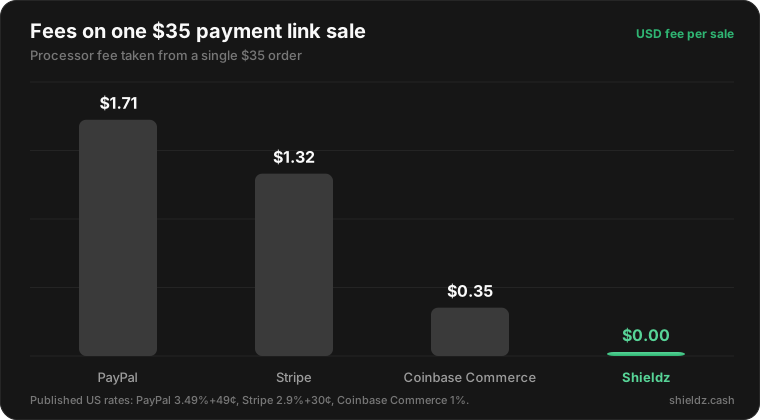
A crypto payment link also removes chargebacks. Once a payment confirms on-chain it is final, so a buyer cannot claw it back a month later. And with a non-custodial tool the money goes straight to your wallet, so there is no balance to withdraw and nothing for a processor to freeze.
Way 1: the free generator (no account, 30 seconds)
Use this for a single amount: an invoice for a client, a deposit, a one-off sale.
- Copy your wallet address. Any EVM wallet works, MetaMask, Rabby, Coinbase Wallet, a hardware wallet. You only ever share the public address.
- Open the payment link generator. Paste the address, type the amount in USD, and pick what you want to receive, for example USDC on Base. Add a note so you know what it was for.
- Click “Generate payment link”. You get a hosted checkout URL and a QR code. Send either one.
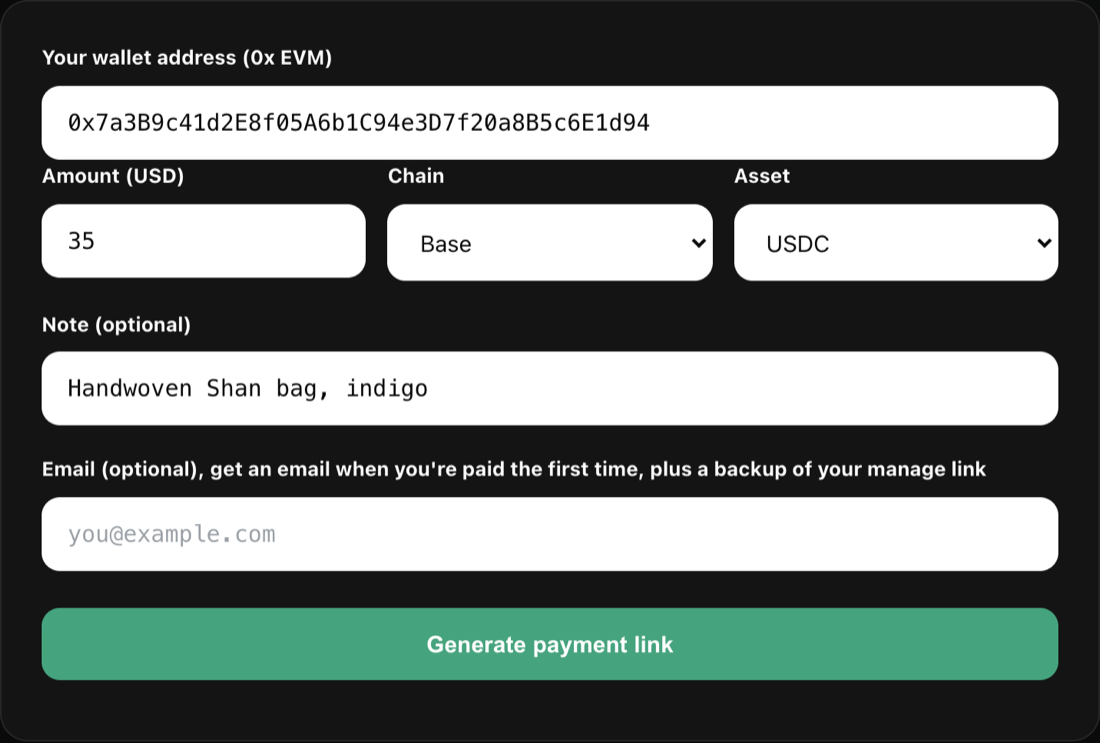
The response also gives you a private manage link. Keep it: it shows whether the link was paid, and it lets you claim a full dashboard later without losing anything. Add an email if you want a message the first time you are paid. The same thing works from code with a single request, covered in accept crypto payments with one URL.
Way 2: a product link from the dashboard (quantity, shipping, questions)
Use this when you sell a thing more than once. A product link is a reusable order page at shieldz.cash/l/plink_... that stays the same while you change the price or stock behind it.
- Add a product in the merchant dashboard: a name, a description, a price and an optional photo.
- Create a link for it under Links. Turn on what you need:
- Adjustable quantity, so a buyer can order 1 to 5 with a stepper.
- Email and shipping address, if you post physical goods.
- Ask the buyer for up to three short text answers, like a size, a color or a username on your site.
- After payment, a thank-you message or a redirect to your own page.
- Share the link. It works in a bio, a DM, a QR code on a market stall, or behind a button on your site.
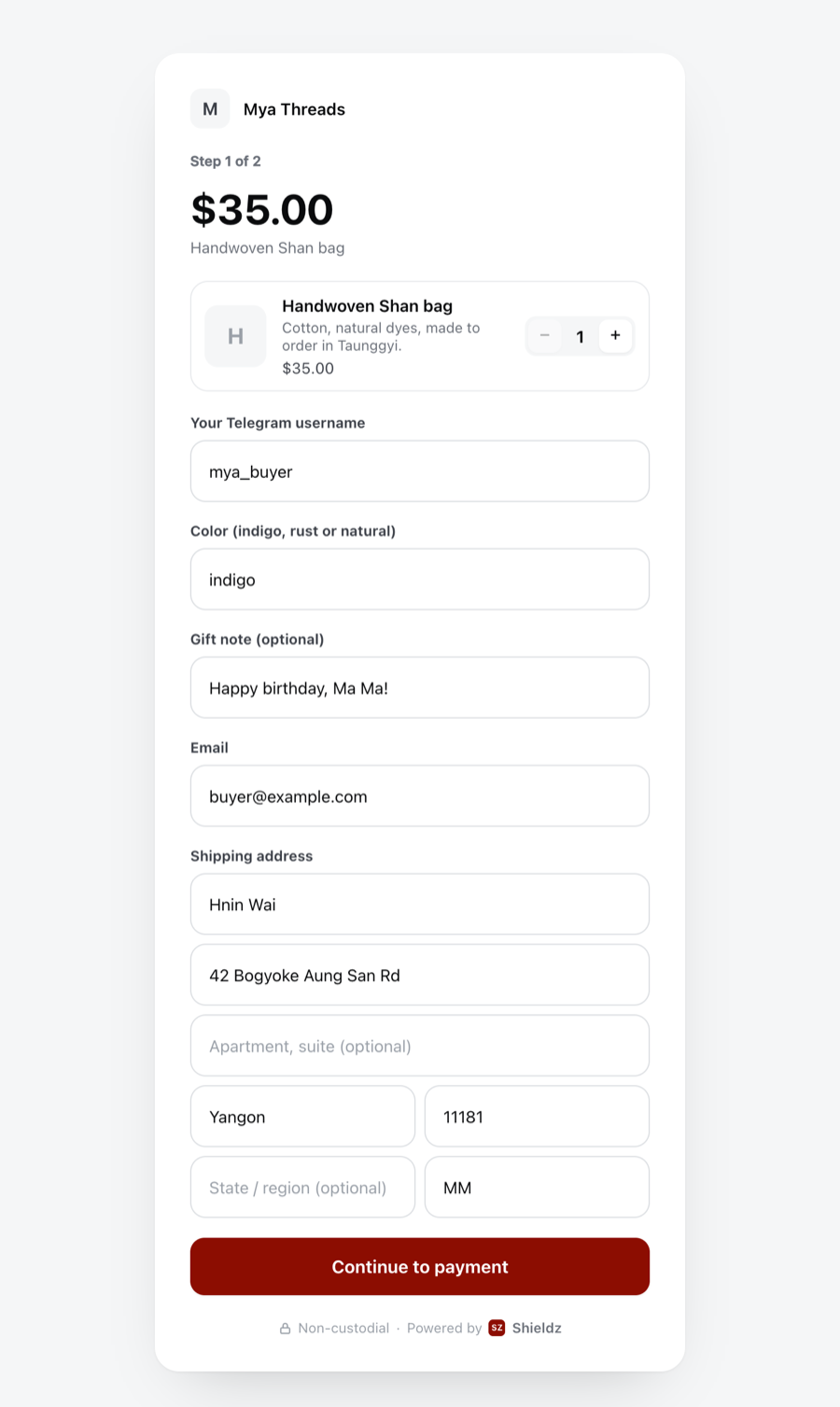
The buyer fills in the form, then lands on the hosted crypto checkout to pay. Every answer is saved on the invoice, so you see who ordered what in the dashboard, in your Telegram notification and in the webhook. For a deeper look at selling this way through chat apps, read how to sell on Telegram and Instagram for crypto.
Way 3: one API call
Use this when links are created by your software: a link per customer, per order, or per listing. Create a product once, then a link for it.
curl https://shieldz.cash/api/v1/products \
  -H "Authorization: Bearer sk_live_..." \
  -H "Content-Type: application/json" \
  -d '{"name":"Handwoven Shan bag","default_price_data":{"unit_amount_usd_cents":3500}}'

curl https://shieldz.cash/api/v1/payment_links \
  -H "Authorization: Bearer sk_live_..." \
  -H "Content-Type: application/json" \
  -d '{
    "line_items":[{"product":"prod_...","quantity":1,"adjustable_quantity":{"enabled":true,"maximum":5}}],
    "collect_shipping_address":true,
    "custom_fields":[{"key":"color","label":"Color (indigo, rust or natural)"}],
    "after_completion":{"type":"hosted_confirmation","hosted_confirmation":{"custom_message":"Thanks! We ship within 2 days."}}
  }'
The response carries the url to share. When someone pays, the invoice.paid webhook includes their answers under metadata.custom_fields. The SDKs for Node, Python, PHP and Rust wrap the same calls, and the crypto payment API quickstart covers keys and webhooks.
Which one should you use?
| You want to | Use |
|---|---|
| Bill one client or take one deposit | The free generator |
| Sell the same item again and again | A dashboard product link |
| Ask for size, color, a username or an address | A dashboard product link |
| Make links from your own app or bot | The API |
| Put a checkout on your website | The payment widget |
If you are not sure, start with the generator. The manage link lets you claim a dashboard later, so nothing you do now is wasted.
What the buyer sees
The buyer opens your link, picks how to pay, and gets an exact amount, an address and a QR code on a hosted checkout. They pay from whatever wallet they already use. Shieldz watches the chain and marks the order paid once it confirms. The money settles to your wallet, never to a Shieldz balance. If you want to check a payment yourself, see how to verify a crypto payment.
FAQ
Is it free to create a crypto payment link? Yes. Shieldz charges a $0 platform fee. The buyer pays only the network gas for their transaction.
Do I need an account? Not for a one-off link from the generator. Product links with quantity, shipping and custom questions live in the free merchant dashboard.
Where does the money go? Straight to the wallet address you set. Shieldz is non-custodial: it never holds your funds or your keys, and you can verify that yourself.
Can I ask the buyer questions on the link? Yes. A product link can ask up to three short questions, such as a size or a username, and the answers come with the order.
Make your first link
Open the payment link generator and make one now, it takes less time than reading this paragraph. When you are ready to sell repeat items, set up products in the merchant dashboard, and see pricing for the full picture. For the bigger setup, read how to accept crypto payments.
