 shield
How to Swap Crypto With a Hardware Wallet: Ledger, Trezor and Keystone
Shieldz Swap Swap now with shieldz.cash Any coin, any chain · 0.15% fee · no account Swap nowA hardware wallet is the safest place to keep crypto you care about, and the most awkward place to trade it from. The usual routine is to send coins to an exchange, swap them there, and withdraw them again: three transactions, two network fees, and a stretch of time in which your coins sit in someone else’s wallet. That defeats the reason you bought the device in the first place.
Shieldz Swap connects to a Ledger, Trezor or Keystone directly from the browser and swaps across chains without your coins ever leaving your control. The keys stay on the device, the transaction is built for you, and you approve it on the hardware wallet’s own screen. This guide covers how each device connects, what you can swap from each, and what to check before you press the button.
Why swap from the hardware wallet itself
When you swap from a hardware wallet with Shieldz Swap, nothing about the device’s security model changes:
- The private keys never leave the device. Shieldz builds an unsigned transaction, the hardware wallet signs it, and the signed transaction is broadcast. There is no step where a key, a seed phrase or a signing permission is handed to anyone.
- You confirm what you sign on a screen you trust. The amount and the destination appear on the device. If your computer were compromised and tried to swap in a different address, the device would show it.
- No exchange account in between. No deposit to a custodial balance, no withdrawal queue, no identity checks. The swap is executed by the cross-chain protocol you pick, NEAR Intents, Chainflip or Relay, and the result lands at the address you chose.
The service fee is a flat 0.15%, the same on every route, and it is shown on every quote before you connect anything. For how the routing works in general, see the Shieldz Swap launch guide.
What each device can swap from
The three devices connect in different ways and support different chains. Here is what Shieldz Swap can build and sign a payment for on each:
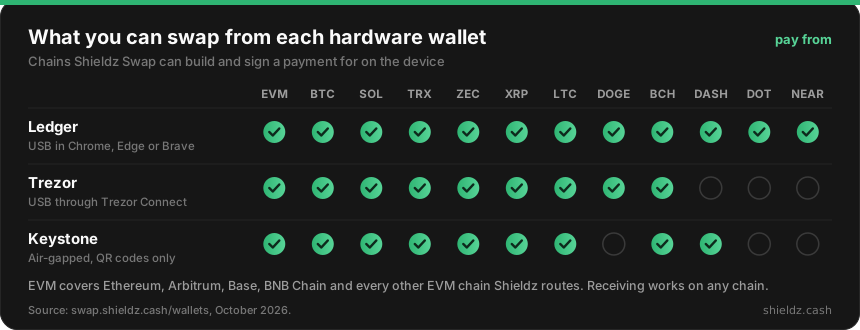
That is the side you pay from. The side you receive on is wider: you can receive on any of the 45 chains Shieldz routes by pasting an address, whether or not your hardware wallet supports that chain. Swapping Bitcoin from a Trezor into USDC on Solana, for example, just needs a Solana address to receive at.
Ledger: USB, right in the browser
Shieldz talks to a Ledger over USB using WebHID, with no Ledger Live in between.
- Plug your Ledger in, unlock it and open the app for the coin you are sending on the device: the Bitcoin app for BTC, the Ethereum app for ETH or any EVM token, and so on.
- On swap.shieldz.cash, choose Connect, then Ledger. The browser asks once for permission to talk to the device.
- Pick the coin you have and the coin you want, enter an amount and set the address you want to receive at.
- Check the amount and the deposit address on the Ledger screen and approve. Shieldz tracks the swap until it lands.
WebHID only exists in Chromium browsers, so use Chrome, Edge or Brave. Safari and Firefox cannot talk to a Ledger over USB. Ledger covers the most chains of the three, including Polkadot and NEAR. More detail on the Ledger page.
Trezor: through Trezor Connect
Trezor devices connect through Trezor Connect, Trezor’s own bridge between websites and the device.
- Connect your Trezor by USB and unlock it.
- On Shieldz, choose Connect, then Trezor. A Trezor Connect window opens and asks you to share the account you are paying from.
- Pick your coins, enter an amount and set where you receive.
- Check the amount and deposit address on the Trezor screen and approve.
Keep the firmware up to date: newer coins and transaction types depend on it. More on the Trezor page.
Keystone: air-gapped, QR codes only
A Keystone never connects to your computer at all. Every exchange of data happens through QR codes and your camera, which removes USB and Bluetooth as a way in.
- On Shieldz, choose Connect, then Keystone, and scan the account QR code your Keystone shows. This shares the public account only.
- Pick your coins, enter an amount and set where you receive.
- Scan the transaction QR code Shieldz shows with your Keystone, then check and approve it on the device.
- Hold the signed QR code on the Keystone up to your camera. Shieldz broadcasts it and tracks the swap.
You need a working camera on the computer or phone you swap from. More on the Keystone page.
What to check on the device screen
The device screen is the last line of defence, and it only helps if you read it. Before you approve:
- The amount matches what you entered in the swap form.
- The destination matches the deposit address or contract the Shieldz review screen shows. Deposit addresses are issued by the protocol, never by Shieldz.
- The network is the one you meant to pay from. An ETH on Arbitrum and an ETH on Ethereum are different coins as far as the device is concerned.
If anything on the device differs from what the browser told you, reject it. A swap that is rejected costs nothing.
A hardware wallet does not stop you from approving a bad transaction; it only makes sure you see it first. Our explainer on how wallet drainers work shows what a malicious request looks like, and why reading the device screen matters.
What it costs
There are three costs on any swap, and they are the same whether you sign with a hardware wallet or a browser extension:
- Shieldz service fee: 0.15% on every route, already included in the amount you are shown.
- Protocol fees: whatever NEAR Intents, Chainflip or Relay charges for the swap itself, also already included.
- Network fee: the gas or miner fee your device’s transaction pays on the chain you send from. The device shows it before you approve.
For comparison, MetaMask’s built-in swap charges 0.875% and Phantom’s 0.85% on select pairs. Our swap fee comparison goes through every wallet’s rate.
FAQ
Can I swap crypto directly from a Ledger without Ledger Live? Yes. Shieldz Swap connects to a Ledger over USB from Chrome, Edge or Brave using WebHID, builds the transaction in the browser, and you approve it on the Ledger. Ledger Live does not need to be open.
Does Shieldz ever see my private keys or seed phrase? No. The keys stay on the hardware wallet. Shieldz only sees your public address and the signed transaction, and never asks for a seed phrase. Anyone who does is trying to rob you.
Can I receive on a chain my hardware wallet does not support? Yes. You can receive on any of the chains Shieldz routes by entering an address on that chain. Only the chain you pay from has to be supported by the device.
Which hardware wallet supports the most chains on Shieldz? Ledger: EVM chains, Bitcoin, Solana, Tron, Zcash, XRP, Litecoin, Dogecoin, Bitcoin Cash, Dash, Polkadot and NEAR. Trezor and Keystone each cover nine families.
Try it
Open swap.shieldz.cash, get a quote without connecting anything, and connect your Ledger, Trezor or Keystone when you are ready to sign. The full list of supported wallets is on the wallets page.
