 shield
Cross-Chain Crypto Swap Without Custody: Meet Shieldz Swap
Shieldz Swap Swap now with shieldz.cash Any coin, any chain · 0.15% fee · no account Swap nowA cross-chain crypto swap should be simple: you hold one coin on one network, you want another coin on another network, and you would like the best price without handing your money to anyone. In practice it rarely is. Every wallet sends you down one route, prices differ from protocol to protocol by more than the fee you are worrying about, and the easy options are custodial exchanges that hold your funds while they do it.
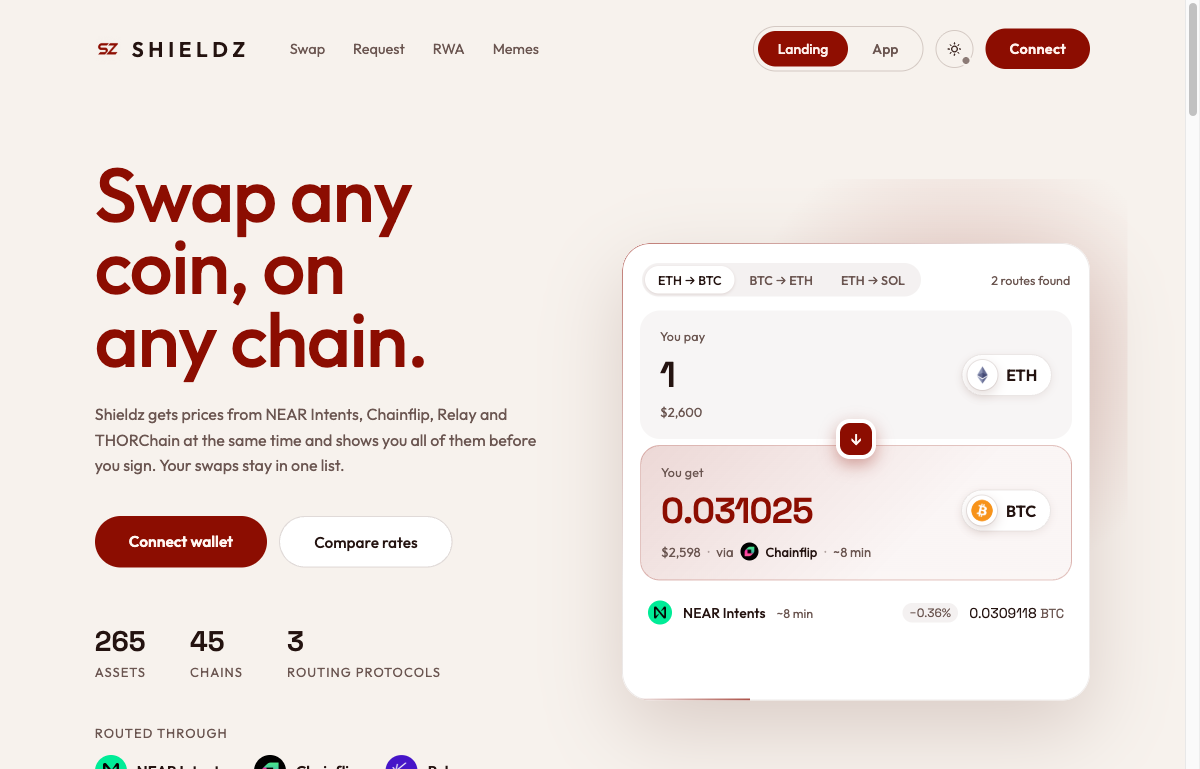
Shieldz Swap is our answer. It asks independent cross-chain protocols for a price at the same moment, shows you every route they offer before you sign, and sends you straight from your own wallet to theirs. It never holds your funds or your keys, there is no account and no KYC, and the service fee is a flat 0.15% on every route, shown on every quote. This guide explains how it works, what it costs, what you can swap, and where the risks are. If you are a merchant, the companion post on how cross-chain crypto payments route covers the checkout side.
What Shieldz Swap is, and what it is not
Shieldz Swap is a non-custodial interface for cross-chain swaps. It does three things: it asks protocols for prices, it shows you their answers side by side, and it helps you send exactly the right transaction from your own wallet. The swap itself is executed by the protocol you choose, on its own network and under its own rules.
That division matters because it decides who can lose your money. A custodial exchange takes your coins into its own wallet, swaps them on its books, and pays you out later; until it does, you are its creditor. We have written about why custody is the real risk in crypto payments, and the same logic applies to swaps. With Shieldz Swap there is no point where we hold anything:
- You sign every transaction in your own wallet. MetaMask, Rabby, Coinbase Wallet, OKX, Trust, Phantom, Solflare, Backpack, TronLink, Noir and WalletConnect all work, and so do the hardware wallets: Ledger, Trezor and Keystone.
- Deposit addresses come from the protocols, not from us. When a route needs a deposit, NEAR Intents, Chainflip or Relay issues the address and controls what happens to funds sent to it.
- There is no account. No email, no password, no identity documents. Your swap history lives in your browser.
What it is not: an exchange, a broker, a custodian or an investment adviser. It is a routing and signing tool, and the terms say so in plain language.
Why routing matters more than the fee
Most people compare swap apps by their fee. The fee matters (we will get to it), but on a cross-chain swap the bigger number is usually the route. Different protocols are different machines: Chainflip runs its own cross-chain liquidity pools with native Bitcoin, NEAR Intents settles through a solver auction, and Relay fills from market-maker inventory. (THORChain, which swaps through its own continuous liquidity pools, is switched off for now.) On any given pair, at any given minute, any of them can be the best.
Here is a real example from the live router, all three protocols asked for the same swap at the same second:
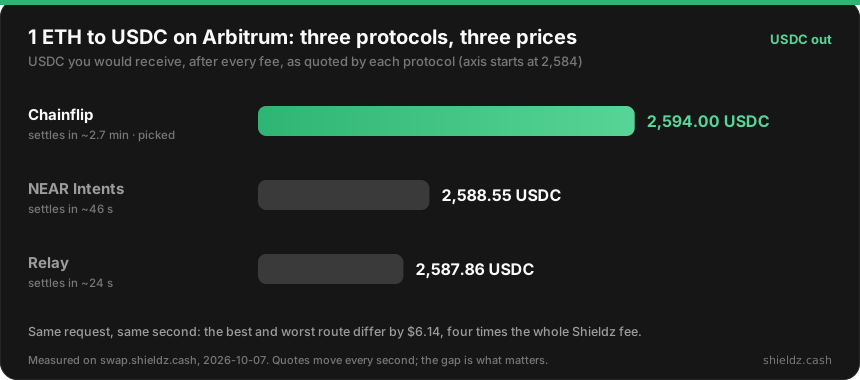
A wallet that only knows one route would have given you one of those numbers and no way to know about the others. Shieldz Swap shows all of them and picks the best for you.
How “best” is decided
“Best” is not simply the biggest number. Every quote is ranked on what you receive after every fee, discounted slightly for how long the swap takes to settle (5 basis points per minute). The reason is practical: a route that pays 0.2% more but takes eight minutes to arrive is not always better than one that lands in 40 seconds, especially when prices are moving.
The trade-off works in both directions. In the chart above, Chainflip takes about 2.7 minutes against Relay’s 24 seconds, but pays $6 more, so it wins. For 1 ETH from Ethereum to Arbitrum, NEAR Intents offered 0.997995 ETH and Relay 0.997909 ETH, about 22 cents less; Relay was picked because it lands 20 seconds sooner. Every route stays on screen, so if you prefer the larger amount you can see exactly what you are trading for the time.
Quotes stream in as each protocol answers
Asking several protocols takes as long as the slowest one. Instead of making you wait for all of them, Shieldz Swap streams each answer to your screen the moment it arrives and re-ranks as the rest come in.
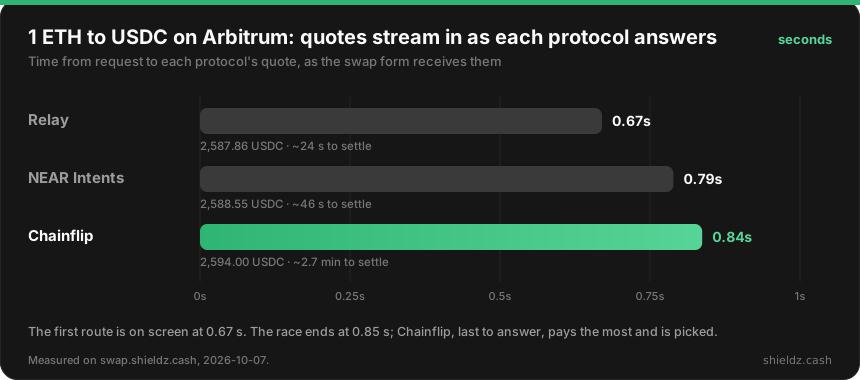
The ranking you see while quotes arrive uses the same rule as the final answer, so the route on screen does not jump around when the last protocol reports in. And you can only review and confirm a swap once the race is complete, so what you sign is always the router’s final pick.
How to make a cross-chain crypto swap, step by step
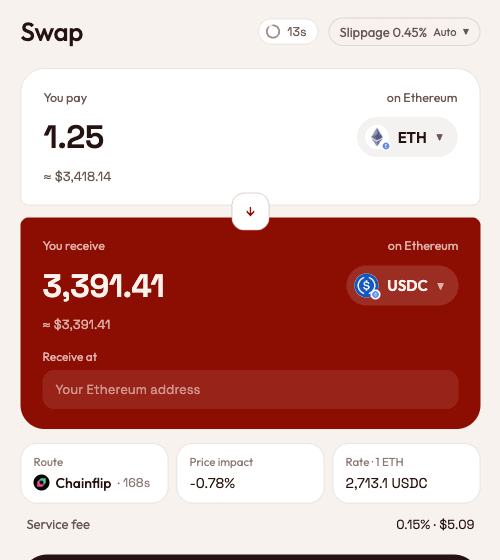
- Open swap.shieldz.cash and pick your coins. Choose what you pay with and what you want to receive, on any of the supported chains. You can get a quote without connecting anything.
- Enter an amount and read the routes. Prices arrive within about half a second. The form shows the route, how long it takes to settle, the price impact, the rate and the service fee in dollars.
- Set where you receive. Enter the address on the destination chain, or connect a wallet for that chain and pick one of its addresses.
- Review. The review screen shows the minimum you will receive, your slippage tolerance (set automatically from how the pair has behaved, or by you), the network fee and the service fee. If anything looks off, go back.
- Confirm in your wallet. Shieldz Swap builds the transaction; your wallet shows it and you sign. Nothing moves until you do.
- Track it. The swap appears in Activity with live status until it lands. If a swap cannot complete, the protocol refunds the funds to the address you paid from.
That is the whole flow. There is no deposit into a Shieldz balance first and no withdrawal afterwards, because there is no Shieldz balance.
Fees, plainly
There are three kinds of cost on any cross-chain swap, and it is worth being exact about each:
- The service fee. This is what Shieldz charges: 0.15% on every route, NEAR Intents, Chainflip, Relay and Jupiter alike. It is already taken out of the amount you are shown, and the form shows it as its own line with its dollar value.
- Protocol fees. Each protocol charges for its own work: liquidity and outbound fees, and on NEAR Intents a 0.20% platform fee that NEAR applies to every swap. These are part of the quote you see, and they are not ours.
- Network fees. The gas your wallet pays to send your transaction on the chain you pay from. The form shows an upper bound; your wallet shows the exact figure before you sign.
How does 0.15% compare? Here is the service fee alone on a $1,000 swap, using each app’s published rate:
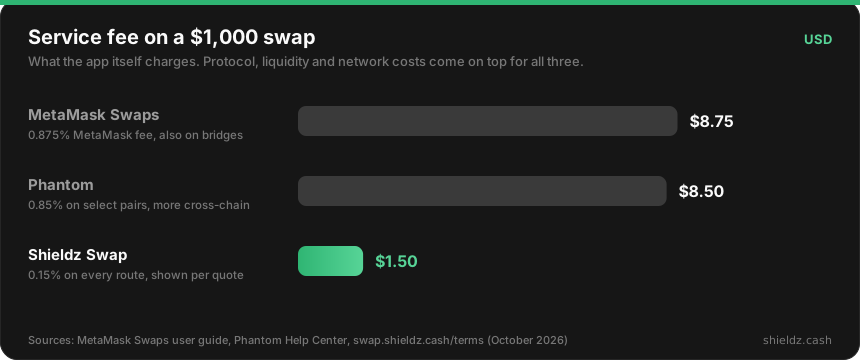
To be fair to the field: Uniswap’s own interface charges no fee at all, but it swaps tokens within a single chain. It will not turn your bitcoin into ether or your Solana USDC into Base USDC, which is the problem a cross-chain swap solves. Among apps that do cross chains, a flat 0.15% is low, and more importantly it is the same on every route, so the router never has a reason to prefer one protocol because it pays us more.
What you can swap
The router lists 265 assets across 45 chains, and the number moves as protocols add and pause pools. That includes the coins people actually hold:
- Bitcoin and its family: BTC, Litecoin, Bitcoin Cash and Dogecoin, plus wrapped bitcoin on EVM chains (WBTC, cbBTC).
- Ethereum and the EVM chains: ETH and tokens on Ethereum, Arbitrum, Base, Optimism, Polygon, BNB Chain, Avalanche, Gnosis, Linea, Scroll, Blast, Berachain, Monad and more.
- Stablecoins everywhere: USDC and USDT on most of those chains, plus DAI, USDe, PYUSD and others.
- Non-EVM chains: Solana, NEAR, Tron, TON, XRP, Cardano, Sui, Stellar, Polkadot, Aptos and Zcash (transparent addresses).
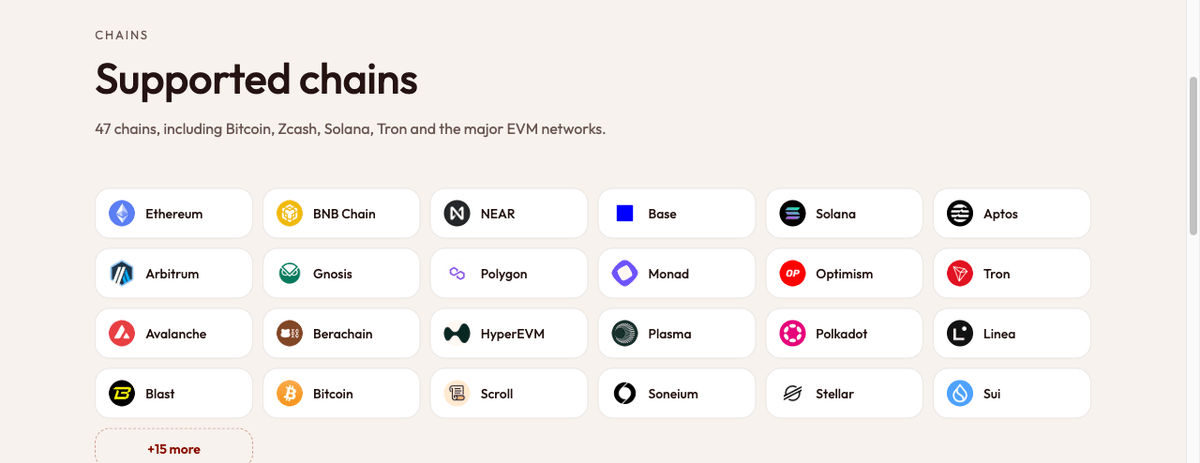
Not every pair has a route at every size. Each protocol sets its own minimums and supports its own set of chains (Chainflip, for example, has no route into Base USDC), so the form only offers what can actually be filled. If a pair is too small for every protocol, the form tells you the minimum instead of failing at the last step.
More than swaps
The same app does a few related things, all with the same non-custodial rule.
Request. Create a link asking someone to pay you a set amount of a set coin at your address. The person paying can use any coin Shieldz routes; it is swapped on the way and lands in your wallet as the coin you asked for. Nothing is held in between. It is the personal version of pay-with-any-coin, and for businesses the Shieldz payment link generator does the same with invoices and webhooks.
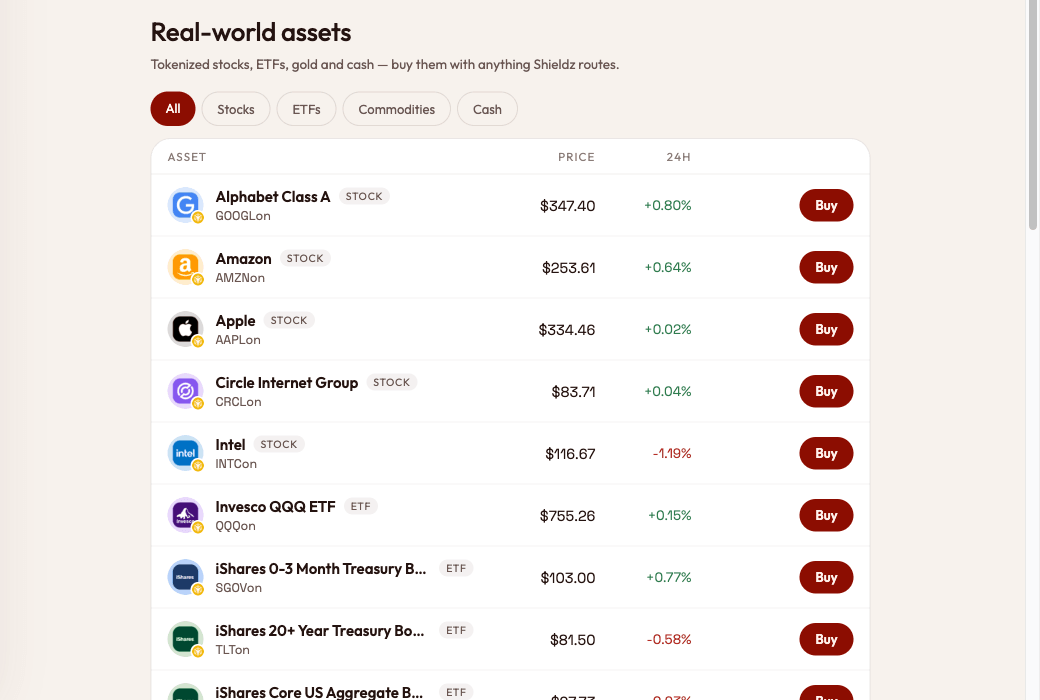
RWA. Buy tokenised stocks, ETFs and gold with crypto, delivered to your own wallet. The stocks, ETFs and USDon are issued by Ondo Finance on BNB Chain and are not available to U.S. persons or in other restricted jurisdictions; gold comes as Tether Gold (XAUT) or PAX Gold (PAXG).
Memes. Trade Solana memecoins through Jupiter, straight from a Solana wallet. These tokens are unverified and are clearly marked as such: many are designed to defraud buyers, so treat this tab as the high-risk corner it is. Every memecoin swap is paired with SOL or USDC, and the same 0.15% fee applies.
Activity. Every swap you start from a browser is listed with its live status, and you can watch any address to see its swaps too.
Safety: what non-custodial does and does not protect you from
Non-custodial removes one risk entirely: there is no Shieldz balance that can be frozen, lost or misused, because there is no Shieldz balance. It does not remove the risks of crypto itself, and we would rather you hear them from us:
- Transactions are final. Sending the wrong coin, to the wrong network, or the wrong amount can lose funds permanently. The app builds the exact transaction for you; check it in your wallet before you sign.
- Protocols can fail. Each route depends on the protocol’s own contracts, validators and liquidity. A swap can be slow, refunded or, in the worst case, caught in an exploit. That is why routes that stop answering are hidden, and why every quote shows how long it is expected to take.
- Prices move. The minimum received and your slippage tolerance bound how bad a fill can get; a swap that would land below the minimum is refunded instead.
- Phishing is the most common loss. Only use swap.shieldz.cash, never share a seed phrase, and read what your wallet asks you to sign. Our explainer on how wallet drainers work shows what a malicious signature request looks like.
The full list is in the risk disclosure, and what we collect (very little, and nothing that identifies you) is in the privacy policy.
How it fits with Shieldz payments
Shieldz started as a non-custodial crypto payment gateway for merchants, with no platform fee: buyers pay, and the money lands in the merchant’s own wallet. When a buyer pays in a coin the merchant does not settle in, the checkout swaps it on the way using the same kind of routes described here. Shieldz Swap takes that routing engine and puts it in your hands directly, for your own coins. Merchant checkout stays fee-free; the 0.15% applies to swaps you make in the swap app.
FAQ
Is Shieldz Swap custodial? No. You sign every transaction in your own wallet, deposit addresses are issued by the protocols, and Shieldz never holds your funds or your keys. There is no account to fund or withdraw from.
What does a cross-chain swap cost on Shieldz Swap? A 0.15% service fee on every route, plus the protocol’s own fees and the network fee to send your transaction. All of them are already included in the amount shown, and the service fee is shown in dollars on every quote.
Which protocols does Shieldz Swap use? NEAR Intents, Chainflip and Relay for cross-chain swaps, and Jupiter for Solana memecoins. Each swap is quoted by all the protocols that support the pair, and you see every route before you sign.
What happens if a swap fails? The protocol refunds the funds to the address you paid from, less any network or protocol costs already incurred. You can follow the status in Activity until it resolves.
Try it
Open swap.shieldz.cash, pick two coins and watch the protocols race for your swap. No account, no KYC, and a flat 0.15% you can see before you sign. If you take crypto for a business, start with how to accept crypto payments or the developer docs.
